The Nikon D5000 offers almost everything a photography enthusiast could want. But the same can be said of the D90, which is more expensive. In many comparisons, the D5000 receives more favorable marks. But is that really justified?Nikon D5000
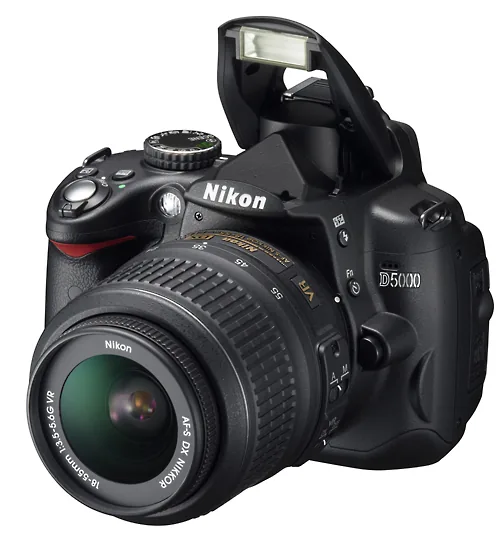
Although Nikon does not officially confirm that they use exactly the same image sensor, it is safe to assume that the CMOS sensors in the D90 and the D5000 are identical. Image quality is exceptionally high. Starting with noise, which invariably gets the most attention: ISO 800 looks excellent, ISO 1600 remains usable without much loss, and even the equivalent of ISO 6400 is certainly still practical.
That makes the heart of the D5000 a major strength and brings the D90's high image quality to a lower price class.
With the GP-1 unit, GPS information is added directly to the image files.
EXpeed
The D5000 naturally also features EXPEED image processing, and it does its job very well. Color, white balance, tonal gradation, and image compression are handled so neatly that you will rarely feel the need to edit your photos afterward.
D-Lighting has evolved in this camera into a comprehensive set of tools for achieving ideal brightness distribution without post-processing on your PC. You can apply it actively, immediately after taking a photo, later to your JPEGs, or during in-camera RAW conversion.
Bottom line: D-Lighting is simply a major strength
You can, of course, also use it on your PC in Nikon Capture NX, but many users will appreciate being able to optimize an image in-camera with a few quick, simple steps.
The D5000 offers four D-Lighting strength levels plus an automatic mode, in which the camera chooses the level based on contrast and brightness distribution. In the spirit of “don't ask how it works—just benefit from it,” this is the ideal mode for beginners.
It is also the best choice for those of us who tend to forget settings; otherwise, you might unintentionally continue shooting with a particular setting for too long. Bottom line: D-Lighting is simply a major strength.
Post-Processing
The D5000 (a current compact Nikon alternative is the Nikon Z50II) offers many of the same in-camera editing options as the D90, including a function that makes the converging lines of a building photographed at an upward angle appear parallel.
Perhaps even more useful is the option to straighten tilted horizons. The distortion-correction function is another welcome feature.
With Nikon lenses, this correction can also be applied automatically, while third-party lenses can still benefit from manual correction.
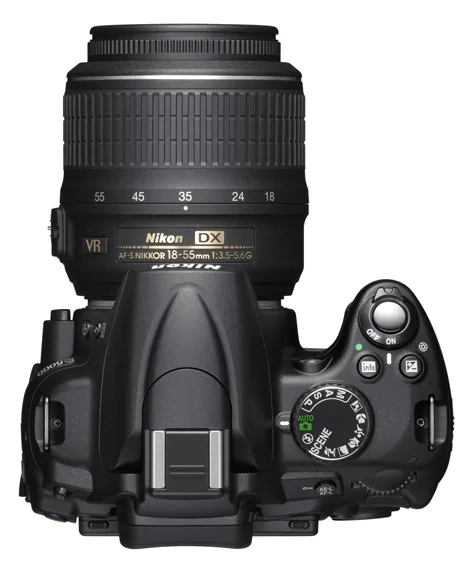
Completely new—at least for Nikon—is the addition of extra scene modes. Five were always available from the dial on top of the camera (the usual five plus a mode for photos of children), but another 13 are now available in a menu. These include high key, low key, dusk, sunset, and more. The modes are ideal for beginners, as well as anyone who wants a distinctive effect without having to think about the technical details.
Automatic Corrections
The automatic distortion correction mentioned above, which straightens lines that are straight in real life, often works perfectly. It is not always one hundred percent accurate, but it always improves the image. You might consider turning the feature off only when your priority is the finest possible detail.
The LCD screen offers versatile positioning, although some positions are not possible when the camera is mounted on a tripod with a fairly large mounting plate.
Much the same applies to automatic correction of chromatic aberration—the colored fringes found mainly in image corners. Broadly speaking, the endless complaints about chromatic aberration can finally stop, although this correction naturally comes at some cost to the rendering of the finest details.
But if you have to choose between two drawbacks, most people will prefer an image without chromatic aberration.
Articulating Screen and Live View
One of the main strengths of this compact DSLR—roughly the same size as the D60, so compact and easy to handle, but with a more substantial grip—is its articulating screen. It pivots from the bottom of the camera's rear panel, directly below the viewfinder, which is a very convenient position, and offers a wide range of adjustments.
That position at the bottom of the rear panel also has a disadvantage: when the camera is mounted on a tripod, the screen can barely tilt downward unless the tripod has a very small mounting plate.
The LCD is bright and clear, and Nikon has given it an attractive graphical interface. Live-view speed is somewhat disappointing; the Olympus E-620 shows that it can be faster and hunt less.
Both are still easily outperformed by the Sony A350 and A300, which focus in live view almost as quickly as they do during normal shooting.
Broadly speaking, the endless complaints about chromatic aberration can finally stop
The D5000 naturally also has face-detection autofocus, though it, too, could respond more quickly. A new feature can track a moving subject across the frame and keep it in focus.
In normal shooting mode, the camera focuses very quickly and accurately using its 11 AF points. Its success rate with moving subjects is impressive for a camera in this class.

Video Recording
The live-view image can be recorded as video, making this Nikon's second DSLR with movie capability. It records at up to 1280 x 720 (720p) at 24 fps with mono sound. In this mode, a single clip can last up to 5 minutes.
You will almost never be able to tell from the photos which camera was used to take them!
As on the D90, there is one important limitation: autofocus does not work while recording, so you always focus manually. You can set the aperture in A and M modes, however, and use a small aperture for greater depth of field when a single shot includes subjects at different distances.
The real appeal of video with a sensor this size—selective focus and pronounced sharp-to-blurred transitions—is therefore greatest in short, static shots in which the subject distance does not change.
More Than a Shrunken D90
A nice touch is the Quiet mode Nikon added to the D5000: in exchange for a slightly slower shutter cycle, you get a subdued shutter sound.
And now for the conclusion: in terms of specifications and capabilities, there seems to be little difference between the D90 and D5000. But the differences do matter.
For example, the D90's viewfinder is considerably larger, making photography feel more like experiencing a scene than merely recording it. The D90 is also more accommodating when it comes to lenses: it can autofocus even with lenses that lack a built-in focus motor.
The D5000 provides autofocus only when the lens has a motor. The D90 also has a top LCD that lets you adjust several important settings, such as ISO, more quickly.
The D5000 lacks a depth-of-field preview button and a programmable function button. On the D5000, however, you can assign another function to the self-timer button, such as direct ISO adjustment; you then select the self-timer through the LCD.
Taken together, these differences give serious enthusiasts a real choice, with the D5000's articulating screen perhaps providing the strongest reason not to choose the D90.
Beginners who know they are unlikely to delve deeply into photographic technique may be better served by the D5000, with its many additional scene modes and approachable design, including example images in some menus.
If you are still undecided after considering all this, compare the cameras' size and handling and look through their viewfinders. One thing is certain: you will almost never be able to tell from the photos which camera was used to take them!



