
Photographers considering a new laptop or MacBook should definitely take a solid-state drive, or SSD, into account when choosing a configuration. Tony Thijs explains why.
It is of course clear that in a hundred years we will be laughing about the current state of affairs regarding computers. Without a doubt, the hard drive will be part of all those horror stories from our great-grandchildren about those primitive times at the beginning of the twenty-first century.
Durability
A development that is more promising than the hard disk is the SSD. SSD stands for Solid State Drive and no longer has a single moving part inside.
The latest generation uses a so-called non-volatile memory, which retains its data when the power is removed from the drive. This is in contrast to the normal memory of a computer.
Within the SSD world there are two main trends, the MLC (multi level Cell) and the SLC (Single Level Cell) architecture.
MLC stores multiple bits (zero or one) per memory cell and the SLC stores a single bit per memory cell. Although the MLC is more efficient, it does come at a price in terms of sustainability.
The lifespan can be up to a factor of ten shorter than the SLC SSDs, which can last for more than a quarter of a century under favorable conditions and with average use!
Especially with the new TRIM technology, the speed gain compared to a hard disk is considerable
The advantages of SSDs are therefore of many kinds. The absence of moving parts is one, but the speed benefits should not be underestimated either. Especially with the new TRIM technology, the speed gain compared to a hard disk is considerable.
Virtually No Latency
Besides faster loading times (data throughput), more expensive SSDs can locate stored data with virtually no latency. The absence of electric motors also reduces energy consumption and heat generation, helping notebooks run longer on a charge.
Everything comes at a price, however. With read and write speeds of 30 and 40 megabytes per second respectively, inexpensive SSDs offer few advantages over a hard drive whose platters spin at 5,400 rpm.
Midrange models perform much better, with read speeds of 150 MB/sec and write speeds of 100–130 MB/sec. Top SSDs reach 230 MB/sec when reading and 200 MB/sec when writing. In servers or powerful desktop systems, RAID 1 (Redundant Array of Inexpensive Disks) can increase that speed, making speeds of 1,000 MB/sec possible.
Progress
In graphics-oriented environments, where MacBooks account for a large share of the systems in use, the more expensive models deliver real progress. They require a larger investment, but cutting load times in half for RAW files larger than 20 MB is a major improvement—not to mention the benefits when working with uncompressed TIFF files.
Anyone who looks at the official prices of Apple SSDs will of course be shocked, but... Samsung and Kingston also supply SSDs with a significantly cheaper price tag, even for the top models from the SSDNow V+ series. Furthermore, Apple dealers such as MyCom and MacHouse are willing and able to install these SSDs for a small fee.
MacHouse
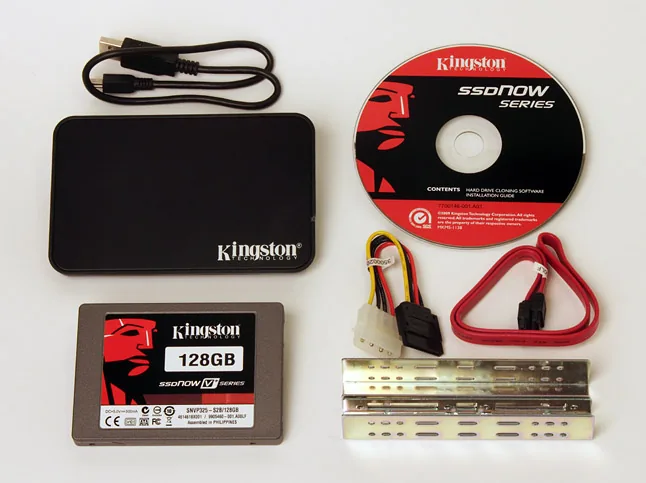
MacHouse is the leader in service and the MacBook owner can simply walk in with a strange SSD and have it installed for the friendly price of 25 euros, as assured by MacHouse in Amsterdam. For this purpose, a backup is made and the new HD is installed. The old drive can then continue to be used as an external drive, for example. Kingston supplies a neat casing for many SSDs.
Kingston appears to be a favorable exception that always works
Anyone who is handy and has the right tools can also do this themselves. However, a small study on the Apple forums shows that not all SSDs on the market can be combined equally well with Apple MacBooks. Recent updates (version 1.7) of EFI (Apple's Extensible Firmware Interface) often throw a spanner in the works. Kingston appears to be a favorable exception that always works.
Anyone who wants to use an SSD as an external drive also gets cloning & backup software for Windows from Kingston, while Apple users can choose from a wide range of free cloning programs online.
The only thing for the user to do is to check out the various offers because the prices can vary enormously. This also applies to the different offers from one brand. The 64 GB and 128 GB SSD drives are still somewhat affordable, but above that the prices increase dramatically.



